
Hoverkart Attachment for Hoveroo Hoverboards: Fit, Setup and Safe Riding
What if your hoverboard could offer a whole new way to ride, without standing on the footpads? A Hoverkart attachment for Hoveroo hoverboards turns the experience into a seated, kart-style ride. It can be a fun change for confident riders and an appealing option for children who prefer sitting. Before you begin, check that the attachment suits your board and learn how to fit it securely.
This guide explains how to compare seated and standing rides, check board details for fit and prepare for supervised practice. The Hoveroo Hoverkart is designed to suit most standard 6.5-inch, 8-inch, 8.5-inch and 10-inch hoverboards. A size match is a useful starting point, but always compare your specific board with the compatibility details and product instructions. You’ll also learn what to inspect after fitting, why a helmet and suitable riding area matter, and how to help your child build confidence at a sensible pace. Ready to find the right setup for your family? Let’s get rolling!
Key Takeaways
- A Hoverkart changes the ride from standing to seated, offering another way to enjoy a compatible hoverboard.
- For a Hoverkart attachment for Hoveroo hoverboards, match your board model and dimensions with the stated compatibility details.
- Compare seated kart-style riding with standing riding to decide which better suits your child and your plans.
- Follow the product instructions, check the attachment is secure and inspect it for visible wear before supervised practice.
- Choose your setup by identifying the hoverboard, matching compatibility and reviewing the rider guidance.
What a Hoverkart Attachment for Hoveroo Hoverboards Changes
With a hoverboard, your child stands upright on the footpads. With a Hoverkart, they sit in a kart-style attachment paired with a compatible board. The hoverboard provides the powered ride, while the attachment changes the rider’s position and style of play. A Hoverkart attachment for Hoveroo hoverboards gives your family another way to enjoy a compatible Hoveroo Hoverboard outdoors.
A hoverboard is also known as a self-balancing scooter. Adding a kart-style seat changes how the rider interacts with the board, so don’t assume the controls or riding experience will be identical across different setups. Follow the product instructions for the specific board and attachment, particularly for operating them together.
Seated kart-style riding versus standing on a hoverboard
Standing riding keeps your child upright on the board’s footpads. A Hoverkart setup lets them sit instead. One child may enjoy the seated position, while another may prefer riding upright. These are different play styles, and neither is automatically easier or more suitable for every rider.
Consider what your child enjoys and can manage: standing on the board or sitting in a ride-on position? Their preference can help guide your choice. Whichever setup you use, supervise closely and follow the relevant product instructions rather than guessing how to operate the combination.
Who may enjoy a Hoveroo Hoverkart setup?
A Hoveroo Hoverkart may suit a child who’s keen to try a seated ride and can follow your directions during supervised play. Think about your child’s confidence, attention and willingness to pause when asked. There’s no single ride style that suits everyone, so talk through the options and let their interests help guide the decision.
Before choosing, read the age recommendations and rider-limit details for both the Hoveroo Hoverboard and the Hoverkart. The guidance for one product doesn’t automatically apply to the other. If your child is still learning, stay close during the first session and choose an area that suits the product instructions. This gives you a chance to see how they respond to the seated style and whether it feels right for your family.
The appeal is a change of position and play style, not a promise about performance. Keep expectations grounded in the product instructions, and let your child’s interest and your supervision shape the experience. Next, check the board and attachment details to make sure they’re a suitable match.
How to Check Hoverkart Attachment Fit on a Hoveroo Hoverboard
Start with the exact model name, not just the board’s appearance. Hoveroo’s compatibility information describes the Hoverkart as suitable for most standard 6.5-inch, 8-inch, 8.5-inch and 10-inch hoverboards. The word “most” matters: matching a wheel size doesn’t confirm that every board will fit. Compare the Hoverkart’s stated compatibility with the product details for your specific Hoveroo Hoverboard before setting up the ride.
Fit also depends on whether the board’s dimensions and attachment points match the kart’s fitting guidance. Don’t assume that two boards fit alike because they look similar, have similar wheels or come from the same brand. Use the instructions for your exact products, and don’t force the parts together if they don’t fit as described.
Match the attachment to the hoverboard model
Compare the full name of your Hoveroo Hoverboard with the Hoverkart’s stated compatibility, then check any listed wheel size and dimensions. A size within the published range is a helpful starting point, but it isn’t a substitute for model-specific guidance. Don’t assume the Hoveroo Hoverboard and Off-Road Hoverboard have identical attachment points or fit simply because both are hoverboards.
Check the attachment and rider details
Follow the fitting method and diagrams supplied for the Hoverkart and board. Use only the stated attachment points and fitting directions. Don’t add hardware or improvise a connection. Once fitted, check that the setup is secure as described in the instructions. Read the age guidance and rider limit for both products, using the details that apply to your child and setup.
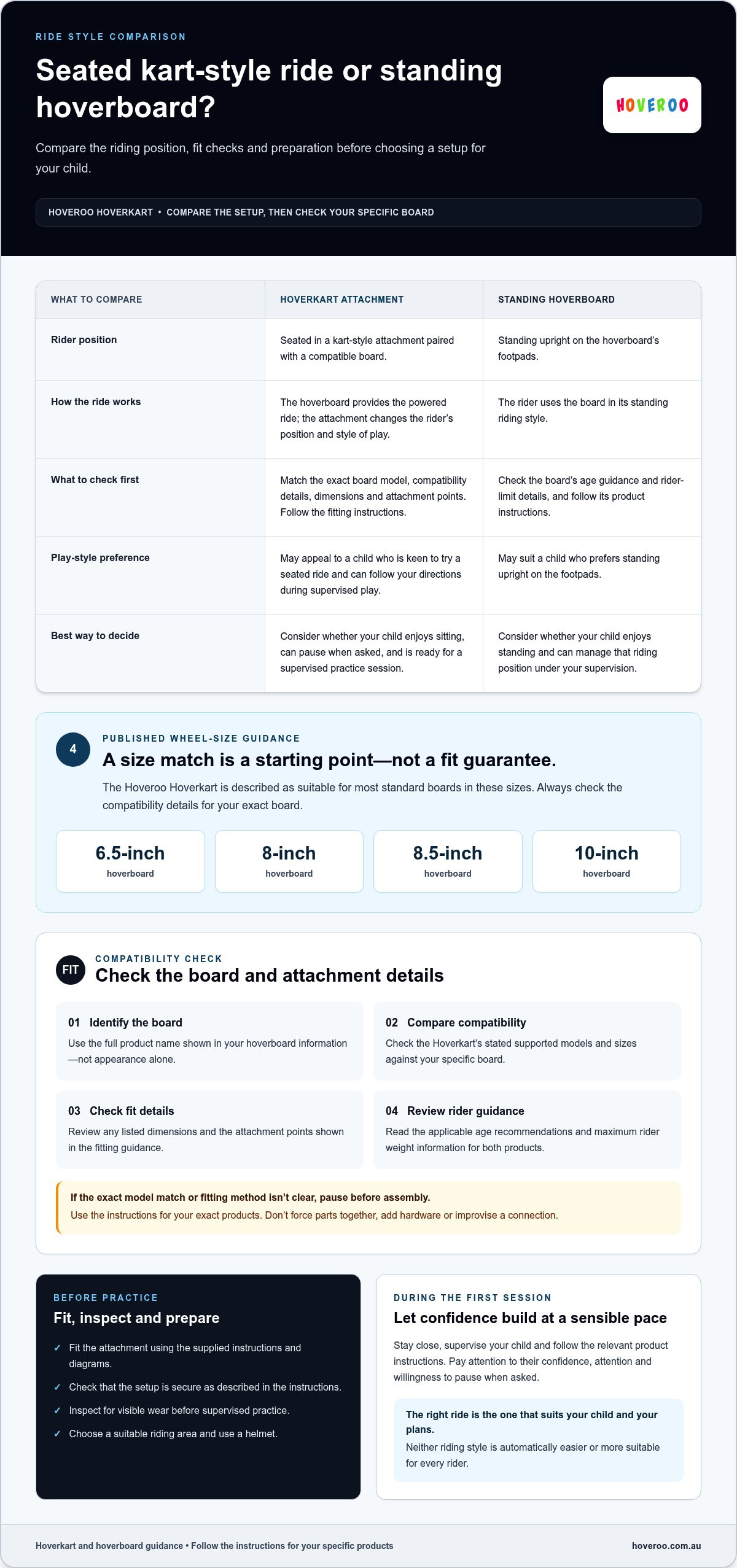
Fit checklist: match the exact board model, stated compatibility, listed dimensions and attachment points, then review the age guidance and rider limit.
- Board model: Write down the full product name shown in your hoverboard information.
- Compatibility: Compare that name with the Hoverkart’s stated supported models and sizes.
- Fit details: Check any published dimensions and the attachment points shown in the fitting guidance.
- Rider guidance: Read the applicable age and maximum rider weight information before use.
Keep the product information handy while you compare. If the exact model match or fitting method isn’t clear in the instructions, pause before assembly instead of relying on appearance or a rough measurement. Once you’ve checked the details, explore the Hoveroo ride-on range and consider which setup suits your family.
Hoverkart Attachment or Standing Hoverboard: Which Ride Suits Your Plans?
Choosing between a Hoverkart and standing hoverboard riding is about matching the setup to your child and the play session. The kart attachment changes the rider’s position and adds a fitting step. Standing keeps the board in its original riding style. Use this comparison to think through how each option could fit your family’s plans.
| Consideration | Hoverkart attachment | Standing hoverboard |
|---|---|---|
| Rider position | Seated in a kart-style setup paired with a compatible board. | Standing on the hoverboard’s footpads. |
| Play style | A seated option for a child interested in a different way to ride. | An upright option for a child who prefers the board’s original format. |
| Setup considerations | Check the attachment’s compatibility and follow its fitting guidance. | Use the hoverboard as directed in its product instructions. |
When a seated setup may suit the play session
A seated session may appeal if your child is excited by the kart-style position and wants a change from standing. Consider the space available and whether your child can follow your directions throughout play. Check the product guidance for where and how the setup is intended to be used. Don’t assume a surface is suitable based on the kart’s appearance.
When standing hoverboard riding may be the better fit
The standing format may suit a child who prefers riding upright and wants to use the board in its original configuration. Your child’s interest matters more than a general rule about which setup they should choose. Consider the specific Hoveroo hoverboard model and its stated details, rather than assuming all boards offer the same features or are intended for identical use.
Board type can also shape your decision. If you’re comparing a standard board with an off-road option, read the off-road versus regular hoverboard guide alongside the product information for your model. A board’s type or description doesn’t prove that a Hoverkart attachment is suitable for it. Match the attachment with the stated compatibility and follow the guidance for the exact products in your setup.
Before deciding, ask your child which position they’d like to try, consider whether the play area and supervision suit that session, then review the relevant instructions. If their preference changes between outings, use that as a guide for the next session. Keep each setup within its product guidance and let your child’s interests help shape the plan. The best fit is the option that suits their preferred style of play and the practical details of your setup.
Set Up a Hoveroo Hoverkart and Start with a Safety-Minded Ride
Ready to get rolling? Keep the first ride calm by following the instructions for your exact Hoveroo Hoverkart and hoverboard models. Don’t rely on memory or assume the fitting method is the same across different products. A few checks before your child rides can help you spot an insecure connection or visible wear before the session begins.
Fit and inspect the Hoverkart before riding
Use the fitting steps provided for the relevant products. Don’t add tools, parts or adjustment methods that aren’t in those instructions. Once fitted, check the setup as directed and look for visible wear or damage before each session. Follow any inspection advice supplied with the Hoveroo products.
Keep the product guidance close by as you work through this routine:
- Read the instructions. Review the fitting and operating guidance for both the Hoverkart and the compatible hoverboard.
- Fit as directed. Follow the stated method and use the attachment points described for your specific products.
- Inspect the setup. Check the attachment as directed and look for visible wear, following the product guidance.
- Prepare your rider. Use a properly fitted helmet and suitable protective gear, and check the applicable age and rider-limit guidance.
- Begin supervised practice. Choose an open, suitable space consistent with the product guidance, and stay with your child as they start.
A helmet should fit properly, rather than simply sit on your child’s head. Make sure they’re comfortable wearing it and any suitable protective gear before starting. Use the product details to see what is included with your setup.
Make the first ride calm and supervised
Keep the first session simple. Choose a space that suits the product instructions and gives your child room to focus without feeling rushed. Explain the key directions before they start, then remain nearby and attentive. Encourage them to pause if they’re unsure, and keep the session within the stated rider limit and model-specific safety advice.
Supervise your child, make sure they wear a properly fitted helmet, and follow the product instructions for every ride.
A Hoverkart attachment for Hoveroo hoverboards changes the setup, so check the complete combination rather than looking at the kart alone. If anything appears loose, damaged or different from the fitting guidance, stop and revisit the instructions before riding. A steady routine helps you prepare, inspect and begin supervised practice with confidence.
Once you’ve reviewed the setup and safety guidance, explore the Hoveroo Hoverkart and ride-on range to find an option that suits your family’s play plans.
Choose the Hoveroo Hoverkart Setup That Fits Your Family
You’ve compared the ride styles and learned how to check fit. Now bring the details together before choosing a setup. The Hoveroo Hoverkart offers a seated way to enjoy a compatible hoverboard, but the right match starts with the exact board model and its product guidance, not appearance alone.
Use the product details to make the final match
Take this decision path before buying or assembling your setup:
- Identify the board. Note the exact Hoveroo Hoverboard model name from its product information.
- Match compatibility. Compare that model with the Hoverkart’s stated compatibility, including any relevant board size or dimensions.
- Review fitting guidance. Check the instructions for the attachment points and fitting method for your products.
- Check rider guidance. Read the applicable age recommendation and maximum rider weight for the Hoverkart and hoverboard.
Keep each detail tied to the product it describes. A rider limit for the Hoverkart doesn’t replace the board’s own limit, and a feature listed for one hoverboard model shouldn’t be assumed to apply to another. Check safety certification details for the exact hoverboard model you’re considering. For example, look for UL 2272 certification in that model’s product information rather than assuming a certification applies to every board.
If a model match or fitting detail isn’t clear in the product information, pause before assembly rather than guessing. The Hoverkart attachment for Hoveroo hoverboards is a seated kart-style ride option for families. Let compatibility and rider guidance lead your final choice.
Keep the next step simple
Review the Hoveroo Hoverkart product information alongside the details for the Hoveroo Hoverboard you plan to pair it with. For a wider view of what to consider before choosing a board, the guide to buying a hoverboard online in Australia can help you compare product details with your family’s needs.
Then think about your child’s preferred ride style, the space where you plan to play and the supervision you can provide. This gives you a clearer picture of whether a seated setup suits your plans, without assuming every board or rider is the same. Keep the instructions handy for fitting and use, and base your selection on the exact model information and stated guidance.
Ready to find a setup for your family’s next outdoor play session? Explore Hoveroo products and choose the Hoveroo Hoverkart and hoverboard combination that matches the published compatibility details and your family’s plans!
Make Your Next Ride a Family Adventure
A new ride setup can be more than a change of position. It’s a chance to plan outdoor play together, let your child share what they’re excited to try and build confidence at a pace that feels right for your family. Keep the first outing simple, stay involved and make room for practice.
As you consider a Hoverkart attachment for Hoveroo hoverboards, let your family’s preferences guide the fun and the product details guide your choice. Hoveroo is an Australian retailer supporting families across the country.
Ready to picture your child’s next outdoor adventure? Explore the Hoveroo HoverKart and find a fun new way to ride! Here’s to fresh-air fun and a setup your family can enjoy together!
Frequently Asked Questions
Can a Hoverkart attachment use its own battery?
The Hoverkart pairs with a compatible hoverboard rather than acting as a separate ride-on vehicle. The board powers the ride, while the attachment provides the seated kart-style setup. Check the product instructions for how your specific Hoverkart and board operate together. Don’t fit or connect an extra battery unless the manufacturer’s guidance explicitly directs you to do so.
Can you remove a Hoverkart attachment between rides?
Remove it only by following the instructions for your specific Hoverkart and hoverboard. If the fitting guidance explains how to detach it, use those steps and keep any components together for the next setup. Don’t pull, twist or force parts to separate. If you’re unsure how it comes off, follow the product guidance before removing it.
How should you store a Hoverkart attachment when it is not in use?
Store the attachment somewhere dry and sheltered, where it won’t be knocked over or buried under heavy items. Keep it away from walkways and places where children might climb on it unsupervised. Check the product guidance for storage directions. Keep the Hoverkart instructions with the attachment, and follow the hoverboard’s separate storage advice, particularly for its battery.
Can a Hoverkart be used on wet ground?
Don’t ride on wet ground unless the instructions for both the Hoverkart and the specific hoverboard say that use is suitable. Damp surfaces can change the conditions under a ride, and a water-resistance rating for a board shouldn’t be taken as approval for wet-ground riding with an attachment. If the surface is wet after rain or watering, wait until it’s dry and follow the product guidance.
Does a Hoverkart attachment need any maintenance?
Use the care guidance supplied for the Hoverkart rather than assuming advice for another ride-on applies. Keep the instructions and model details together so you can refer to the right information if care is needed. Don’t assume a cleaning product or repair method is suitable just because it’s commonly used on other equipment. Follow the product guidance for maintenance, and avoid changes it doesn’t recommend.
Can you take a hoverboard and Hoverkart attachment on a plane?
Don’t assume an airline will accept a hoverboard for travel. Before packing, contact your airline and ask about its current rules for self-balancing scooters, lithium batteries, baggage and carriage. The Hoverkart attachment may have separate baggage requirements, so ask about that too. Follow the airline’s instructions before travelling, and don’t take the setup to the airport expecting it will be accepted without checking first.
What should you do if the attachment feels loose during a ride?
End the session, have your child dismount and switch off the hoverboard. Don’t try to diagnose the problem with your child still seated or by taking another test ride. Note which part seemed to shift and what was happening just before you noticed it. Keep the setup out of use while you follow the model-specific troubleshooting guidance, without attempting an adjustment it doesn’t describe.
Ready to choose a seated ride for your family? Explore the Hoveroo Hoverkart and compare its compatibility details with your Hoveroo hoverboard.