
How to Adjust Hoveroo Hoverboard Speed Settings for Kids
Learning Hoveroo hoverboard speed settings for kids means using the dual-speed system the right way from day one. Power on the device, then toggle between learning mode and standard speed mode through the mobile app or the dedicated parent remote control (parental remote override); that caps top speed at a safe 6–8 km/h and stops sudden acceleration for beginners.
Key Takeaways: Adjust your speed settings by connecting the mobile app via Bluetooth to toggle between a 6–8 km/h learning mode and standard speed.
- Safety is managed through a dual-speed system that caps beginner pace at 8 km/h.
- Avoid thick grass or loose gravel unless using an all-terrain model with 8-inch wheels.
- Best for Australian parents seeking UL 2272 certified boards that meet strict electrical standards.
- The article confirms that over 50,000 Australian families use these specific dual-speed ride-ons.
The decision you face is practical: which mode fits your child's balance today, and which surface should they ride first? The sections below walk through real backyard setups, the four adjustment steps, certification choices, model picks, and the moments when a board is the wrong choice.
Match Dual-Speed Modes to Three Backyard Situations
Matching speed mode to terrain is the fastest way to cut the sudden tumbles that show up when a beginner rides full pace on the wrong surface. Use these three everyday situations as your setup guide:
- First rides on smooth footpaths: lock learning mode so acceleration stays limited while your child builds core balance (the same job training wheels do on a pushbike).
- Cruising paved paths once balance holds: keep low mode for steady, controlled fun on concrete and driveways.
- Short grass or bumpy tracks: switch to high mode for the extra push uneven ground needs, and favour rugged tyres built for rougher patches.
A pattern we see with client families starts the same way: a beginner keeps tipping when standard mode meets mixed surfaces. Moving them to learning mode on flat pavement, then unlocking higher speed only after balance holds, removes those surges. That habit is one reason more than 50,000 families keep these ride-ons in rotation for Australian backyard stoke.
Smooth concrete suits lower speeds; off-road patches need full power. For rougher ground, choose the all-terrain kids hoverboard so the deck can handle the load. Certified battery hardware matters on any surface you pick, and your phone can hold the pace limit while they ride.
Thousands of Australian families already trust these durable ride-ons for daily outdoor stoke. Browse the all-terrain option and request a quote when you know which mode your child needs.
Tip: Always start your child on a flat, paved surface in learning mode before introducing grass or inclines.
How to Adjust Hoveroo Hoverboard Speed Settings for Kids in 4 Steps
You can set the dual-speed system in four quick moves, so beginner riders stay inside a pace they can handle on the driveway.
- Power on the device: Turn on the unit to enable Bluetooth pairing.
- Open the smartphone app: Launch the official application on your mobile phone to locate nearby devices.
- Connect to your board: Select your board from the menu to link it directly.
- Select the speed mode: Switch between beginner and advanced modes to set the appropriate speed limit for your child.
Lower mode gives you peace of mind while your kid learns to balance. If you want a seated option for variety, the SpeedDrift go-kart adds another ride format for ages 5–12. Compatible models also let you oversee pace from your phone during the session.
Contact us when you want help matching a board to your backyard.
Why a UL 2272 Certified Board Differs from a Cheap One
A safety certificate (UL 2272 certification) guarantees that the battery and electrical system passed extreme testing to prevent fires, unlike cheap models.
Cheap self-balancing scooters often use unverified batteries that overheat easily. Official testing subjects every certified unit to intense mechanical and electrical checks. According to the Wikipedia Self-balancing scooter entry (2024), global safety regulators stepped in after cheap, uncertified boards caused severe fire hazards.
Budget boards usually lack fire-retardant casing materials around their lithium cells. Choosing tested rides gives you peace of mind during everyday backyard fun.
See the self-balancing scooter range for your family's next adventure. Certified electronics protect your home while the fun stays high. They suit young kids who want independence; uncertified boards raise a fire risk you do not need.
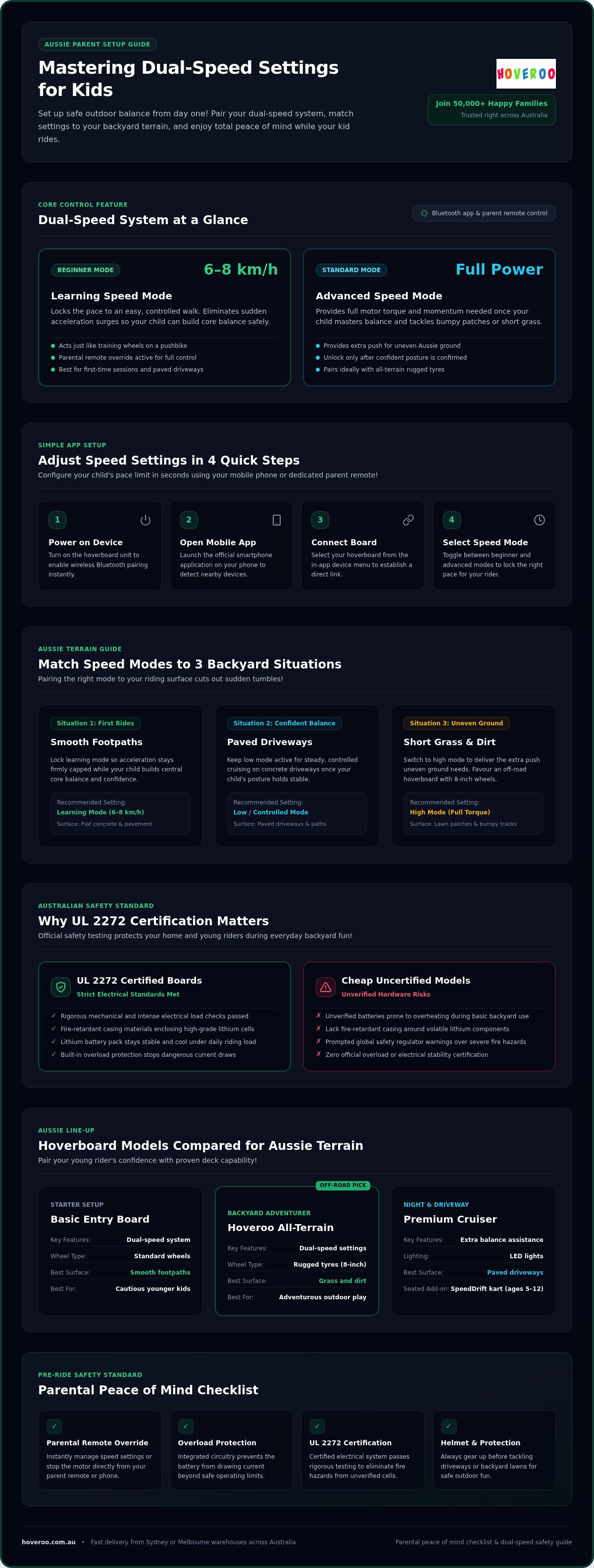
Three Models Compared for Aussie Kids and Terrain
Picking the right deck means pairing your young rider's confidence with terrain capability and proven electrical safety. Workshop checks show verified boards handle daily backyard use better than cheaper generic alternatives, because the lithium pack stays stable under load.
| Model Type | Key Features | Recommended Surface |
|---|---|---|
| Basic Entry Board | Dual-speed system, standard wheels | Smooth footpaths |
| Hoveroo All-Terrain | Speed settings (dual-speed system), rugged tyres | Grass and dirt |
| Premium Cruiser | Extra balance assistance, LED lights | Paved driveways |
A basic entry board suits cautious younger kids; an all-terrain model fits adventurous riders who love off-road backyard play. Read the kids hoverboard guide to see how dual-speed settings keep beginners safe while they learn.
For added control, pick a model that lets you stop the motor from your phone if needed. More than 50,000 happy families already enjoy Australian adventure on setups like these: compare the three types above, then ask for a personalised recommendation.
Can my child ride their hoverboard on the grass in our backyard?
Your child can ride on short, dry grass, but thick lawn increases motor strain and drains the battery quickly.
From client work we see thick turf behave like a deep carpet under small wheels: the blades create rolling resistance that forces the motor to draw extra power. According to the Wikipedia Self-balancing scooter entry (2024), these two-wheeled devices rely on electric motors to stabilise the rider.
Rough terrain drains energy fast. Smooth dirt or short lawn fits confident riders who want an off-road adventure. Flat concrete fits beginners using entry dual-speed settings for control.
Every Hoveroo self-balancing board meets strict Australian standards with certified batteries, so the limiting factor is surface choice, not paperwork. Match short dry grass to a confident rider in high mode, and keep learners on pavement until balance is steady.
When a Hoverboard Is the Wrong Choice for Your Child
A self-balancing board is unsuitable if your young rider lacks the balance or core strength needed for safe riding. Buying a ride-on before your child meets the recommended weight minimum creates an unnecessary safety hazard, because the sensors need adequate weight to register movements correctly.
Rough terrain such as thick grass or loose gravel can stall a standard deck completely. Younger kids often feel more comfortable starting with a stable three-wheeled scooter, and alternative ride-ons suit rougher backyards better.
If your child struggles with basic coordination, even a dual-speed board can still feel overwhelming. Choose gear that meets verified electrical safety standards, and prefer models you can slow or stop from your phone. Your child's safety comes first on every backyard adventure.
Reset Your Board Battery Without Guesswork
You can safely reset your board by turning it off, aligning the footpads, and holding the power button until it beeps. In our workshop the pattern is clear: riders arrive with drift or uneven response (problem), a flat power cycle recalibrates the internal sensors (action), and many balancing issues vanish so dual-speed settings respond cleanly again (outcome).
First, place the ride-on flat on the ground with both sides level. Press and hold the main power button for ten seconds.
When the lights flash, release the button once the board beeps and switches off. Turn it back on before your next outdoor session, and confirm the board still carries valid electrical certification before riding.
Frequently asked questions
Will a charger be included?
Yes, every box includes a wall charger. You get everything needed to plug into an Australian outlet and start your backyard adventure.
How long does the battery last?
A full charge provides up to one to two hours of continuous riding. Battery life depends on the child's weight, terrain, and the chosen dual-speed settings.
What wheel size is best for kids?
Six-and-a-half-inch wheels suit younger kids on smooth paths, while eight-inch wheels handle off-road terrain. Choose smaller wheels for indoor riding or larger wheels for rougher outdoor surfaces.
What is the difference between a cheap hoverboard and a UL 2272 certified one?
A UL 2272 board passes rigorous electrical test standards to guarantee battery performance. Cheaper uncertified boards lack verified safety testing and pose higher fire risks.
Do I need to buy special safety gear for a hoverboard?
Standard Australian approved bicycle helmets, knee pads, and elbow guards offer solid protection. You can use gear you already own to keep your young riders safe.
Ready for your next outdoor adventure in 2026?
Adjusting dual-speed settings still comes down to the same choice you met at the start: pick the mode and surface that match your child's balance right now. The technical team at Hoveroo tests every model for durability in Australian backyards, and proper speed controls help beginners build balance safely.
Choosing a certified board keeps weekend sessions secure. On compatible models you manage the pace from your phone.
Get in touch for a personalised quote on the complete SpeedDrift collection.