
How to Maintain a Kids’ Hoverboard Battery: Simple Care Tips for 2026
How to maintain a kids hoverboard battery without guesswork? Start with a few steady habits, not a repair project. After a ride, check the manual to see when to charge the board, how to read its indicators and where to store it.
Charging and storage can raise questions, especially when different models use different chargers and indicators. The safest routine is to follow the instructions for your child’s specific hoverboard, rather than relying on generic charger-light rules or advice for another model.
This guide covers practical charging, riding and storage habits, along with changes that deserve attention. You’ll learn why it’s best not to leave a hoverboard charging unattended, how to follow the model’s own charge indicators and what to do if performance shifts or the battery appears damaged.
With a Hoveroo Hoverboard or Off-Road Hoverboard, sensible battery care can help you feel more prepared for your child’s outdoor play. A few easy checks can keep the focus where it belongs: on fresh air, new skills and every ride!
Key Takeaways
- How to maintain a kids hoverboard battery starts with following the model’s instructions, inspecting the board and storing it as directed.
- Ride time can vary with battery condition, rider weight and riding style. One shorter outing doesn’t automatically mean there’s a fault.
- Look for repeated changes, and know which signs mean stopping use and taking safety precautions.
- Build a repeatable charging routine using only the charger supplied or specified for your child’s hoverboard model.
- Explore Hoveroo’s Hoverboard and Off-Road Hoverboard for family outdoor play.
Why kids’ hoverboard battery care starts with the basics
Good battery care doesn’t need to become a repair project. Follow the right charging instructions, inspect the board and store it as directed. These habits give you a clear routine and help you notice changes, but they can’t guarantee a particular battery lifespan or prevent every fault.
That’s the heart of How to maintain a kids hoverboard battery: focus on sensible charging, inspection and storage, rather than trying to fix the battery yourself. Hoverboards use lithium-ion batteries, and their safety has drawn attention over the years. For general background, read about Hoverboard safety and battery concerns.
Battery life and battery health are not the same thing
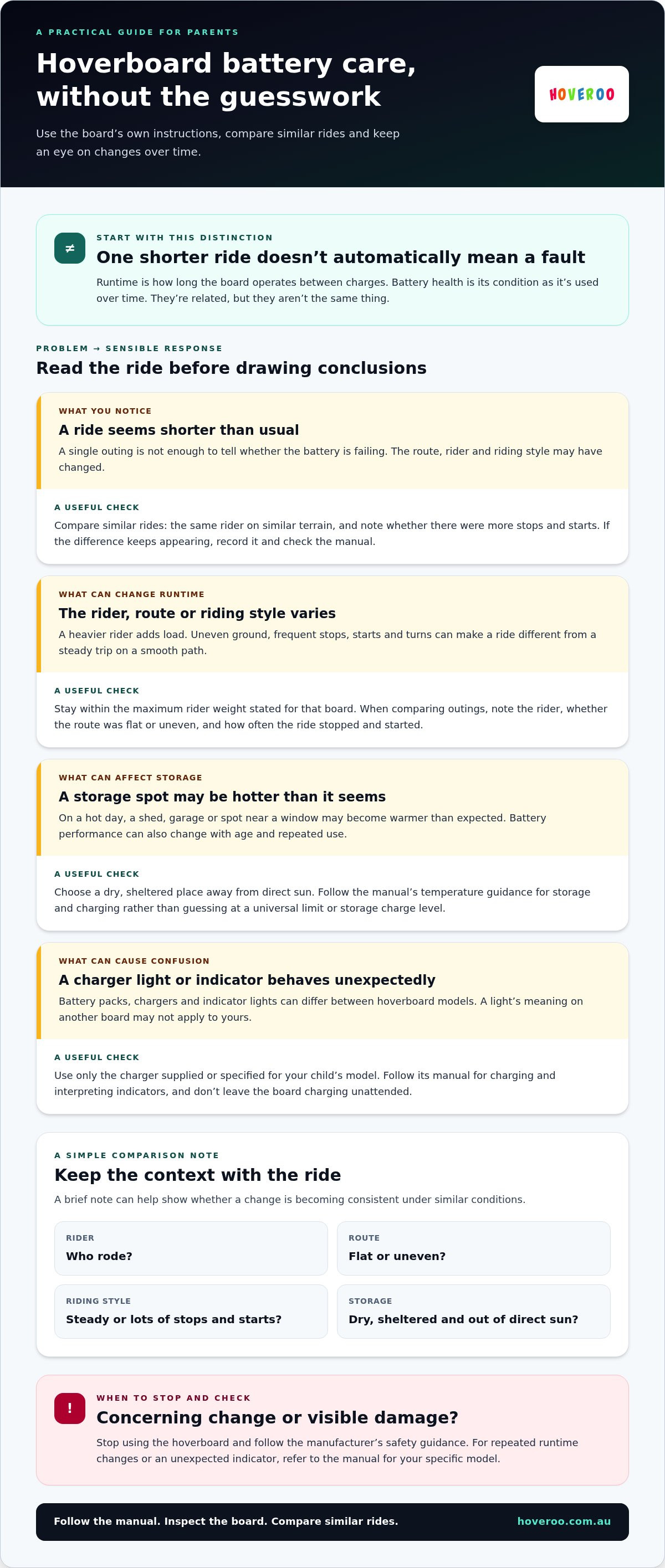
Battery life usually means runtime: how long the hoverboard operates between charges. Battery health describes the battery’s condition as it’s used over time. They’re related, but not interchangeable. If your child rides for less time on one outing, that alone doesn’t prove the battery is failing. The route, rider or riding style may have changed, so look for a pattern rather than judging from one trip.
For example, compare two rides with the same rider on similar terrain and note whether one involved more stops and starts. That gives you a more useful comparison than a single runtime estimate. If the difference keeps appearing under similar conditions, record it and check the manual for guidance.
Start with the hoverboard’s own instructions
Your hoverboard’s manual is the main guide for charging, indicator lights and storage. Follow its directions for your specific model, because battery packs, chargers and indicators can differ between boards. Instructions written for another brand may describe a different setup. If an indicator behaves unexpectedly, use the manual to interpret it instead of assuming every charger light means the same thing.
Keep the manual somewhere easy to find, or save a digital copy if one is provided. Check it before charging or putting the board away for a break. A quick look at model-specific advice is a safer starting point than trying a tip meant for a different hoverboard.
Think of care as a repeatable check-in, not a promise that the battery will last for a particular number of years or rides. Follow the manual, pay attention to how the board behaves across outings and inspect it before use. If you notice a concerning change or visible damage, stop using the hoverboard and follow the manufacturer’s safety guidance. These basics give you a practical foundation for caring for your child’s board.
What affects a kids’ hoverboard battery during everyday rides?
A hoverboard’s runtime can shift from one outing to another, even when nothing is wrong. The board, rider, route and riding style all play a part. Runtime varies with the board, rider and conditions, so compare similar rides before drawing conclusions.
When you notice a change, consider the whole ride: who rode, where they went and how the board was used. One outing rarely tells the full story. Comparing similar rides can help you distinguish an ordinary variation from a repeated change.
Rider, terrain and riding style can change runtime
A hoverboard carrying a heavier rider has more load to move, which can affect how much energy a ride uses. Stay within the maximum rider weight stated for the specific board. Terrain matters, too. Smooth, steady riding differs from frequent starts, stops and turns, while uneven or demanding ground may ask more of the board than a level surface.
For instance, a relaxed ride on a smooth path and a session with repeated bursts of acceleration are not like-for-like comparisons. An Off-Road Hoverboard is a category to consider for uneven terrain, but riding conditions can still vary. If you’re exploring off-road hoverboard riding, compare the terrain guidance for off-road and regular hoverboards before choosing where your child rides.
Keep the comparison simple. Note whether the route was flat or uneven, whether your child stopped and started often, and whether the rider was the same. These details can help you understand a change in runtime without assuming it points to a problem.
Storage conditions and battery age matter too
Battery performance can also change with age and repeated use. There isn’t one guaranteed timetable for this, so focus on how the board behaves over a series of comparable rides. If runtime keeps changing under similar conditions, record what you notice and refer to the model’s instructions for next steps.
Australian weather makes storage worth thinking about. On a hot day, a shed, garage or spot near a window may become warmer than expected. Choose a dry, sheltered place away from direct sun and follow the manual’s temperature guidance for storage and charging. Don’t guess at a universal temperature limit or storage charge level; advice can vary by model.
To make useful comparisons, keep a brief note of the rider, route, riding style and storage conditions. You don’t need a technical log. A few observations can show whether a shorter outing followed a different kind of ride or whether the change is becoming consistent. That context helps you decide whether to keep monitoring or take a closer look at the board’s instructions.
For How to maintain a kids hoverboard battery, understanding these everyday influences is a practical first step. Hoveroo’s hoverboard range includes options for family outdoor play, so you can compare board styles with your child’s intended riding conditions in mind.
Normal battery changes or a warning sign? How to tell the difference
A shorter ride can be disappointing, but one outing on its own doesn’t prove the battery has failed. Check what changed, then look for repeated patterns or visible safety concerns. This guide can help you sort ordinary variation from signs that need attention.
| What you notice | What it may mean | What to do |
|---|---|---|
| Ordinary runtime variation | One ride ends sooner, with no visible damage or unusual behaviour. | Consider whether the route, rider or riding style differed. Keep following the manual. |
| A change worth monitoring | Runtime seems shorter across similar rides, or the board’s behaviour has changed. | Record the conditions and charge behaviour. Check the manual for model-specific guidance. |
| A clear safety concern | Visible damage, unusual heat or an unusual smell from the board or charger. | Stop riding and charging. Keep children away and seek product-specific guidance. |
Changes worth noticing and recording
If ride time seems different, jot down the route, rider, riding style and what you noticed during charging. Compare similar outings rather than treating a smooth path and a demanding ride as a direct test. Check your model’s manual before interpreting indicator lights. Their meanings can vary, so don’t rely on a generic charger-light guide.
A brief note can help you see whether the change happened once or keeps appearing in comparable conditions. That’s a more useful starting point than guessing from one shorter trip.
When to stop using the board
Take visible damage to the hoverboard, battery casing, plug or charger seriously. Unusual heat or an unusual smell is also a reason to stop. Visible battery or charger damage calls for stopping use, not DIY repair. Don’t let your child ride or handle the board or charger. Stop charging too, and don’t open the casing or try to repair the battery yourself.
For a change without an obvious safety concern, consult the model manual and contact Hoveroo support for product-specific guidance. If you’re unsure whether something is damaged or behaving unusually, keep the board out of use until you’ve received advice. A cautious pause is better than experimenting with a battery or charger.
Learning How to maintain a kids hoverboard battery includes knowing when routine observation is enough and when to stop. Use the table as a prompt, not a diagnosis. Your notes can explain what happened, while the manual and product-specific guidance help determine the next step.
A simple kids’ hoverboard battery care routine for charging and storage
A steady routine makes battery care easier to remember. Keep the hoverboard’s manual handy and follow its instructions for charging, indicator lights, cooling and storage. The charger and battery guidance can vary by model, so don’t borrow steps from a different board. This sequence gives you a parent-led check before and after charging.
Before and during charging
- Inspect the equipment. Before connecting anything, have an adult look over the hoverboard, charging port, cable and charger. Check for visible damage and make sure the area is dry and uncluttered. If anything looks damaged or behaves unusually, don’t charge the board.
- Use the correct charger. Choose only the charger supplied with, or specified for, that exact hoverboard model. Follow the manual for connecting it and interpreting its indicator lights. A charger that fits the port isn’t automatically the right one.
- Keep charging adult-led. Set up the board in a suitable dry spot, and follow the manual’s advice about supervision while it charges. Keep children from handling the charger or cable without adult guidance. Avoid leaving the equipment where it could be knocked, tugged or treated as a toy.
Keep the charging area calm and easy to check. That makes it easier to notice if the board or charger changes unexpectedly, while your child can look forward to the next adventure once charging is finished.
After the ride and between adventures
- Follow the cooling guidance. After a ride, let the board cool as directed in its manual before charging or putting it away. Don’t guess at a fixed wait time; use the model’s instructions.
- Clean gently. If the board has picked up ordinary dirt, remove it using a dry cleaning method approved by the product instructions. Keep moisture away from the charging port and electrical parts unless the manual specifically says otherwise.
- Store it thoughtfully. Keep the board and charger in a dry, sheltered place where they won’t be knocked around. Follow the manual’s storage and temperature directions, especially during very warm Australian weather. Store the charger neatly, without pulling or sharply bending its cable.
Use the right charger, inspect the equipment, follow the manual and store everything carefully. That’s the routine in one line. It won’t promise a particular battery lifespan, but it gives you consistent steps to care for the board and notice when something needs attention.
For How to maintain a kids hoverboard battery, simple repeatable habits beat guesswork. You can compare Hoveroo’s hoverboard options with your family’s outdoor plans and the product guidance for each model.
Choose confident hoverboard battery care with Hoveroo
Battery care is one part of a fun, confident ride. A clear family routine helps you stay on top of charging and checks, while your child enjoys outdoor play. It’s not about predicting exactly how long a battery will last. It’s about knowing the board, following its instructions and helping your child get ready for each adventure.
Make the manual part of your family’s routine
Keep the instructions for your child’s exact model somewhere easy to reach, ideally near the place where you charge the board. That makes it simple to check the correct charger, indicators and storage advice instead of relying on memory or tips meant for a different hoverboard. The manual takes priority over general advice in an online article.
Make charging an adult-managed task. Before a ride, have an adult check the board for visible damage and make sure it’s ready to use according to the manufacturer’s instructions. You can also show your child which parts they shouldn’t handle, such as the charger and charging connection, so they can enjoy growing independence while you stay involved in safety checks.
When comparing hoverboards, read the product information and safety guidance for the specific model. Check the rider limits and follow the manufacturer’s instructions for charging and use. These details help you make a considered choice without relying on assumptions about battery size, runtime or charging time.
Find a hoverboard that fits your family’s adventures
Hoveroo’s range includes the Hoveroo Hoverboard and the Off-Road Hoverboard. Think about where your child expects to ride and the kind of experience your family is looking for. Read the product information alongside the relevant instructions, including rider limits and safety guidance for the specific board. That gives you a more useful picture than choosing based on assumptions about battery size, runtime or charging time.
As an Australian retailer, Hoveroo offers families a range of children’s hoverboards to explore online. Review the details for the model that catches your eye, then keep its manual close once it joins your family’s outdoor adventures.
How to maintain a kids hoverboard battery comes down to a repeatable routine and knowing where to find model-specific advice. With the right information close at hand, you can feel more prepared as your child heads out for another ride.
Make every ride a confident next step
A battery-care routine can become part of how your family gets ready to ride. Keep the model instructions easy to find, and let your child take on age-appropriate parts of the pre-ride routine while you handle charging and safety checks. Those small shared habits can help build confidence and encourage independence, one outing at a time.
As you put How to maintain a kids hoverboard battery into practice, remember that product-specific guidance is your best reference if a question comes up. Hoveroo is an Australian retailer of children’s hoverboards, giving families a range of options to explore online. The aim is simple: help your child enjoy getting outside while you feel prepared for the ride ahead.
Ready to find a hoverboard that suits your family’s next adventure? Explore Hoveroo hoverboards for your family’s next adventure! Here’s to fresh air, new skills and plenty of joyful rides!
Frequently Asked Questions
How often should I charge my child’s hoverboard?
Follow the charging schedule in your child’s hoverboard manual, as models can differ. You generally don’t need to charge it just because it hasn’t been used that day. Check the manual for guidance on when to recharge, and plan ahead if your child has a ride coming up. Avoid deliberately running the battery completely flat unless the manufacturer’s instructions specifically call for it.
Should I leave a hoverboard plugged in after it is charged?
No, don’t leave it plugged in after charging is complete unless the model’s manual specifically instructs otherwise. Follow the manual’s directions for recognising a completed charge, since indicator signals can vary between models. An adult can check the board and charger, then disconnect them as instructed. Don’t leave the charger connected for convenience until the next ride.
Can I charge a kids’ hoverboard overnight?
It’s safer to charge while an adult is awake and able to keep an eye on the equipment, rather than leave it charging overnight unattended. Use the charger supplied or specified for the model, and follow its manual for charging and supervision. If your child’s board needs charging before tomorrow’s ride, set it up earlier while you’re around.
Does hot weather affect a hoverboard battery?
Hot conditions can affect where and when you charge or store a hoverboard, so avoid leaving it in direct sun or a hot spot. Choose a dry, sheltered location and use the temperature guidance in the model’s manual. After a warm ride, follow the manufacturer’s directions before connecting the charger. Don’t guess at a universal temperature limit for every board.
How do I know if my hoverboard battery is getting worse?
A repeated drop in runtime on similar rides is more informative than one shorter outing. Keep a brief note of the route, rider and ride conditions, then compare like with like. Check the manual before interpreting indicator lights, as their meanings differ by model. If you notice damage, unusual heat or an unusual smell, stop using and charging the board.
Can I replace a hoverboard battery myself?
Don’t open the hoverboard or attempt a battery replacement yourself. The battery and electrical parts are model-specific, and incorrect fitting or handling can create a safety risk. If you suspect a fault, stop using the board and follow the manufacturer’s instructions. For guidance about a Hoveroo model, contact Hoveroo support rather than trying a DIY repair.
Does riding an off-road hoverboard use more battery?
It can, depending on the surface and how the board is ridden, but there isn’t one fixed difference for every trip. Uneven ground, frequent acceleration and stops, and rider load can all affect energy use. Compare similar rides before deciding runtime has changed: a steady ride on a smooth path isn’t a fair match for a session across rougher terrain.