
Screen Time Alternatives for 8-year-olds: Fun Ideas for 2026
What if the best screen-time swap isn’t a new rule, but an activity your child gets to choose? Finding screen time alternatives for 8 year olds can feel tricky when the same crafts come out again and again, or every idea seems to need you right beside them. If screens are part of a familiar routine, a sudden switch can also be met with a firm “no thanks”.
That’s understandable. At eight, kids are ready for more independence, but they still need options that suit their interests, energy and space. A screen-free activity is more likely to stick when it feels fun, has a clear starting point and lets them make it their own.
Here are practical ideas for indoor and outdoor play, solo projects and activities to enjoy together, from creative challenges to active adventures. You’ll also find simple ways to introduce them gradually, so screen-free time can become a welcome part of the day, not another battle. Pick one idea, let your child add their own twist and see where play takes you!
Key Takeaways
- Choose screen-free activities that feel like play and suit your child’s mood, interests and energy.
- Explore screen time alternatives for 8 year olds across indoor, outdoor, creative, social and quieter play.
- Compare activities by setting, energy, preparation and how much adult involvement they need.
- Make transitions easier with clear boundaries, a choice of activities and a chance to start together.
- Keep outdoor play flexible, from a gentle backyard discovery to more active fun that suits your space and supervision.
Why screen time alternatives for 8 year olds work best when they feel like play
Screens can be convenient. They might fill a quiet moment, fit around family routines or give your child a chance to unwind. Every household handles screen use differently, and there’s no single routine that suits every family. The aim isn’t to label screens as all good or all bad. It’s to make appealing options available so there’s room for other kinds of play and downtime.
A screen-time alternative is simply an activity your child can choose instead of recreational screen use for a while. It could be drawing, building, kicking a ball around or listening to a story. Screen use itself can involve different activities and experiences, as the broad overview of Screen Time describes. That’s why this guide focuses on variety, rather than treating every screen moment the same way or expecting one replacement to work every time.
Quotable takeaway: “The best activity for an eight-year-old depends on their age, interests and the moment, not just their birthday.” A child who’s full of energy after school may want to move, while one who’s tired might prefer a quiet puzzle or some drawing. Think about the setting, how much time you have and whether you can join in. Then offer a couple of options instead of making screen-free play an all-or-nothing rule.
What makes an activity appealing to an eight-year-old?
At eight, many children enjoy having a say and trying activities they can shape themselves. An activity can feel rewarding when they solve a small problem, practise a skill or finish something they’re proud to show you. Offer a choice with a clear starting point: “Would you rather build a cushion fort or invent a board game?” That gives your child a role in the change, and their answer might surprise you!
Interests vary widely, even among children the same age. One might love making up stories; another may prefer sorting, designing or moving about. If an idea misses, it isn’t a failure. Ask what they’d change or offer a different option next time. The aim is to find a good fit for your child today, not assume every eight-year-old will enjoy the same activity.
A screen-free option does not need to be elaborate
Start with what’s already handy. Paper and pencils can become a comic-making session; cushions can make a hideaway; a few household objects can inspire a sorting challenge or pretend shop. For a quick option, put out the materials and let your child take the lead. Other activities may need you to gather supplies, explain the first step or join in for a little while.
Match the set-up to your available time and energy. If you’re busy, choose something your child already knows how to begin, such as drawing or building with familiar toys. If you can participate, help start a shared project, then let your child take over. Keep activities flexible for different abilities, interests and home spaces. Sometimes a simple choice is enough to get play moving!
Screen time alternatives for 8 year olds, grouped by mood and setting
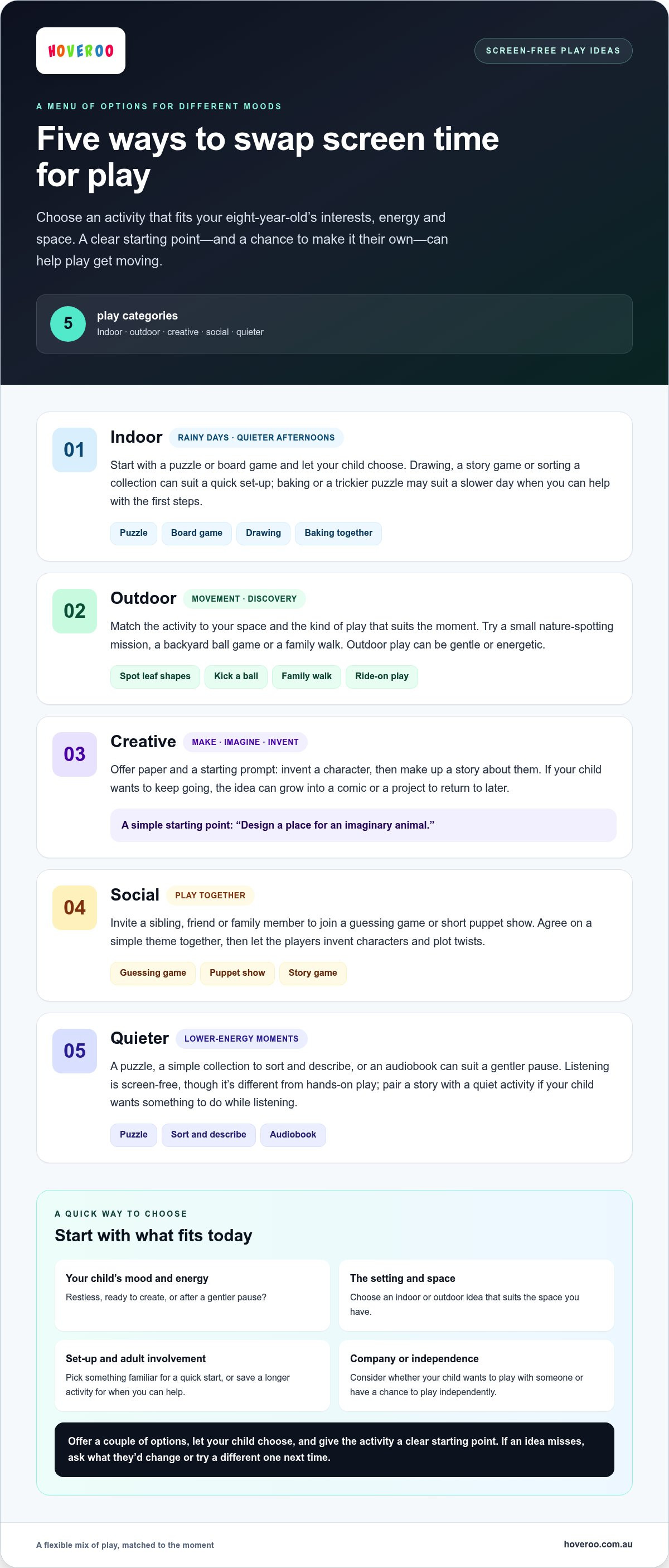
Use the moment as your guide. Is your child restless, ready to make something or after a gentler pause? The ideas below group screen time alternatives for 8 year olds by mood and setting, so you can choose what fits the afternoon instead of relying on one plan every time. Some take almost no preparation; others are better saved for a slower day.
Quick way to choose: “Match the activity to your child’s mood and the space you have, then keep a different kind of play ready for next time.” Consider what you can comfortably supervise and whether your child wants company or a chance to play independently. The American Academy of Pediatrics Screen Time Guidelines resource highlights quality, context and conversation, all useful ideas to keep in mind as you shape your family’s approach.
- Indoor: On a wet afternoon, set out a puzzle or board game and let your child choose which to start. Baking with an adult can suit an unhurried day: choose a simple recipe, then let your child help with age-appropriate steps.
- Outdoor: Try a backyard ball game, nature spotting or a family walk. Start with a small mission, such as finding different leaf shapes, or let your child choose a route around a familiar space.
- Creative: Offer paper and ask your child to invent a character, then make up a story about them. If they’re keen to continue, turn it into a comic or a longer project to revisit later.
- Social: Invite a sibling, friend or family member to play a guessing game or put on a short puppet show. Agree on a simple theme together, then see what characters and plot twists the players invent.
- Quieter: A puzzle, a simple collection to sort and describe, or an audiobook can suit a lower-energy moment. Listening is screen-free, but it’s different from hands-on play. Pair a story with a quiet activity if your child wants something to do as they listen.
Indoor ideas for rainy days and quieter afternoons
Keep a small selection of familiar materials easy to reach, so a quick activity doesn’t become a big set-up job. Drawing can start with a prompt such as “design a place for an imaginary animal”, while a story game might begin with each person adding one sentence. Save baking, a tricky puzzle or a longer craft for when you have time to help with the first steps. Board games and collections can be played solo or shared, depending on your child’s mood. Dedicated card and conversation games, such as those available via reallyfungameslp.com, can also turn a quiet afternoon into an entertaining, screen-free way to connect.
Outdoor activities for movement and discovery
Outdoor play can be gentle or energetic. Spot clouds from the verandah, look for garden visitors, kick a ball or take a family walk. Ride-on play is another option alongside non-motorised games. For electric options, including the Hoveroo Hoverboard, supervise your child, use a helmet and follow the model-specific age and maximum rider weight guidance. Browse children’s ride-on options to explore electric play alongside other outdoor activities, choosing a model that suits your child.
How to choose screen-free activities your eight-year-old will actually try
A long list can be inspiring, but it’s easier to choose when you first check the mood, space and time you have. Is your child ready to move, make something, solve a puzzle or spend time with someone? Use the table to compare practical options, then shortlist two or three. You’re not looking for one perfect activity, just a good starting point for this moment.
“The best first option is one your child is willing to try.” Keep your own limits in view too. A compact activity may suit a small indoor space, while outdoor play needs an appropriate place and level of supervision.
| Activity idea | Setting | Energy | Preparation | Adult involvement |
|---|---|---|---|---|
| Drawing or designing | Indoors, small space | Low to moderate | Low | Can be independent; an adult can offer a prompt |
| Building challenge | Indoors, clear floor or table | Moderate | Low | Usually independent after the idea is set |
| Ball game | Outdoors, with suitable space | High | Low | Shared play or supervision, depending on the game |
| Board game or puzzle | Indoors, table or floor | Low | Low | Solo or shared, depending on the activity |
Match the activity to your child's interests
Ask what sounds good today: making, moving, solving, imagining or playing with others? A child who enjoys building might like a design challenge; one keen to move may prefer a ball game. These are clues, not labels. Interests can change with energy, company and the day, so let your child’s response guide your next suggestion.
Favourite screen themes can spark offline ideas without copying the screen activity itself. A fondness for fantasy might inspire an invented map or creature; a building game could prompt a structure made from household materials. For kids drawn to gaming culture, a strategy board game like Studio Showdown channels that passion into hands-on tabletop play. Offer two options you’re happy with and let your child pick. That small choice gives them ownership without leaving you to plan an endless menu.
Balance effort, space and adult involvement
Be realistic about what the activity asks of you. Some ideas are easy for a child to start alone once the materials are ready. Others need you to explain the rules, supervise or join in. If you have limited room, choose a tabletop puzzle, drawing prompt or quiet construction task. Outdoor space can suit movement games, provided the activity fits the setting and the supervision you can give.
Make a short “easy starts” list together and keep it somewhere visible, such as on the fridge. Include options with different energy levels and set-up needs, then pick two or three that fit the day. If the first choice doesn’t land, offer another rather than turning the moment into a test. The best screen time alternatives for 8 year olds are practical enough to begin and interesting enough for your child to give them a go.
How to introduce screen time alternatives without a daily battle
A new routine is easier to follow when your child knows what’s coming and has a say in what happens next. You don’t need to remove screens suddenly or make every afternoon screen-free. Start with one predictable transition and a few screen time alternatives for 8 year olds that suit your family’s routine. Keep the tone calm and practical: this is a chance to try something different, not a punishment.
Use this flexible sequence as a starting point:
- Agree on a boundary: Choose a clear stopping point together, such as the end of a programme or a planned time to switch activities.
- Give a reminder: Let your child know the transition is coming, so they can finish a game or reach a natural pause.
- Offer a choice: Name two options you’re comfortable with, such as drawing or heading outside.
- Start together and review: Help with the first step, then see how the activity felt afterwards. Keep what worked and adjust what didn’t.
Make the transition predictable and collaborative
A brief warning can make a planned switch feel less abrupt. Try, “After this round, it’s time to choose what’s next.” Keep your shortlist somewhere easy to see, and let your child pick from it. Once you’ve agreed on a routine, follow it in a steady, matter-of-fact way. If plans need to change, explain the change simply and offer another option.
Consistency doesn’t mean every day has to look identical. Your family’s schedule may vary, so agree on a boundary that works for the situation, then make the next step clear. A calm reminder and a genuine choice can help your child know what to expect without turning the transition into a contest.
What to do when the first alternative does not land
Sometimes an idea won’t appeal straight away. That doesn’t automatically mean your child is being defiant or that you’ve chosen badly. The activity may not suit their mood, or they may need more time to shift gears. Offer a different option, change the timing or join in briefly to make the first step easier. If they’re ready, let them carry on independently.
Notice what your child returns to without prompting. A game they ask to play again, a project they revisit or a walk they suggest can all help you refine the shortlist. Keep expectations flexible: a new activity may take a few tries to catch on, and it’s fine to try something else in the meantime.
You’re building a routine, not aiming for a perfect response every time. Keep the boundary clear, listen to your child’s feedback and make small adjustments together. If outdoor movement is one of the options your child enjoys, explore children’s ride-on toys as another way to add active play to the family mix.
Make outdoor play one of your family's screen time alternatives
Outdoor play can be a brilliant change of pace, but it doesn’t have to replace every screen activity or suit every afternoon. Treat it as one choice in your family’s mix. Your child might want a gentle wander today and an energetic game another day. Start with the space, weather, time and supervision you have, then choose an option that feels manageable and fun.
Choose movement that fits your child and your day
Keep it simple. In a small backyard, set a challenge to find something smooth, something with an interesting pattern and something that makes a sound. With more room, try a ball game or create a short course using safe, familiar markers. A nature walk can be low-key too: invite your child to choose what to notice along the way, whether it’s birds, clouds or changing colours.
Electric ride-ons are another way to add movement and outdoor adventure. They’re not the only way to get outside, and they won’t suit every child or setting. Consider where the ride-on would be used, how closely you can supervise and whether the specific model matches your child’s age and maximum rider weight. A short, parent-led introduction can help you set clear boundaries before play begins.
Keep ride-on play parent-led and safety-aware
For any electric ride-on, make helmet use and adult supervision part of the plan. Read the model-specific safety and suitability information, including its maximum rider weight. When comparing hoverboards, look for UL 2272 certification and confirm it applies to the specific model rather than assuming every hoverboard is certified.
Use a parental peace of mind checklist to review the safety information for the particular ride-on. Check which features that model actually has. Where fitted, parental remote override lets an adult control the ride-on remotely, while overload protection helps prevent the battery from being drawn beyond its safe current limit. These features are model-specific, so use the details for the product you’re considering rather than assuming they’re included across all ride-ons.
The same approach works for non-motorised play: choose a suitable space, set simple boundaries and stay involved at the level the activity calls for. A ball game may need you to join in; nature spotting may leave your child free to explore nearby while you supervise. Let your child’s mood and your family’s plans guide the choice. Outdoor time can be a welcome option, not another rule to enforce.
If an electric ride-on sounds like a fit for your family’s outdoor play, explore Hoveroo’s outdoor ride-on options and use each model’s safety and suitability details to guide your choice.
Let your child help shape what comes next
Give your child a small creative role in planning a screen-free moment. They could choose a theme for an afternoon, such as “invent a new backyard game” or “design a hideout for a toy”, then decide what materials or space they’ll need. This turns an activity into a mini project with a purpose, while leaving plenty of room for their own ideas.
For screen time alternatives for 8 year olds, a little ownership can make an idea feel more personal. You might help gather what’s needed, then let your child take the lead. Keep the project light and flexible: there’s no need for a polished result, and changing the plan is part of the fun.
If an outdoor ride-on is part of the adventure your child has in mind, explore Hoveroo’s outdoor ride-on range and find an option that suits your family’s playtime. Here’s to fresh ideas and happy moments together!
Frequently Asked Questions
Is screen time always bad for an eight-year-old?
No. Screen use isn’t automatically harmful, and different activities serve different purposes. A video call with grandparents, a school task and a game aren’t the same kind of screen experience. Ask your child what they enjoy doing online and talk about your family’s expectations without guilt or blame. If screen habits are causing concern about your child’s wellbeing, a calm conversation with an appropriate health professional can help.
How much screen time should an eight-year-old have each day?
The Australian Government Department of Health and Aged Care recommends no more than two hours of sedentary recreational screen time a day for children aged 5 to 17, excluding educational screen use. This is guidance, not a measure of your child’s character or your parenting. Consider what counts as recreational use in your household, then make a plan that reflects the guidance and your family’s routine.
Can audiobooks or podcasts count as screen-free activities?
They can offer a break from watching, especially if your child can listen without looking at a device. Before pressing play, help them choose an episode and set up the audio so they won’t need to keep checking the screen. Listening is different from hands-on play, though, so treat it as one option for a quiet moment rather than expecting it to suit every part of the day.
How can I get my child to try an activity instead of asking for a screen?
Try finding out what your child hopes to get from the screen. Are they looking for a laugh, a challenge, a story or a way to connect with a friend? The answer can point towards a more fitting offline experience. If they want company, for instance, you could plan a shared game with someone later. Keep the conversation curious and avoid treating a screen request as misbehaviour.
What are easy screen-free activities for an eight-year-old indoors?
Try a rolled-sock target toss for a quick indoor game. Place a laundry basket in a clear space and invite your child to see how many socks they can land inside. They can change the throwing line or invent a scoring rule to make it their own. Choose a spot away from fragile objects, and adapt the challenge to the room and your child’s comfort.
Are electric ride-on toys a screen-time alternative for eight-year-olds?
They can be an outdoor-play option for a child who enjoys vehicles and active fun, but being eight doesn’t automatically make every model suitable. Check the specific model’s published age and maximum rider weight guidance, then consider whether you have a suitable place and time for supervised use. For a hoverboard, look for UL 2272 certification and confirm it applies to the specific model.